You are comparing CTR manipulation tools and the pricing structures do not line up. One platform charges flat monthly fees, another sells credits per visit, and some bill for bot traffic that never loads your page. Choosing wrong means paying for clicks that leave no trace you can verify.
This guide breaks down CTRTool's credit-based pricing against flat-fee alternatives and shows what you actually pay per desktop and mobile visit. You will see how campaign types, screenshot proof and visit paths affect cost, then decide whether CTRTool fits your budget.
What Is CTRTool? CTR Campaigns With Proof for Every Visit
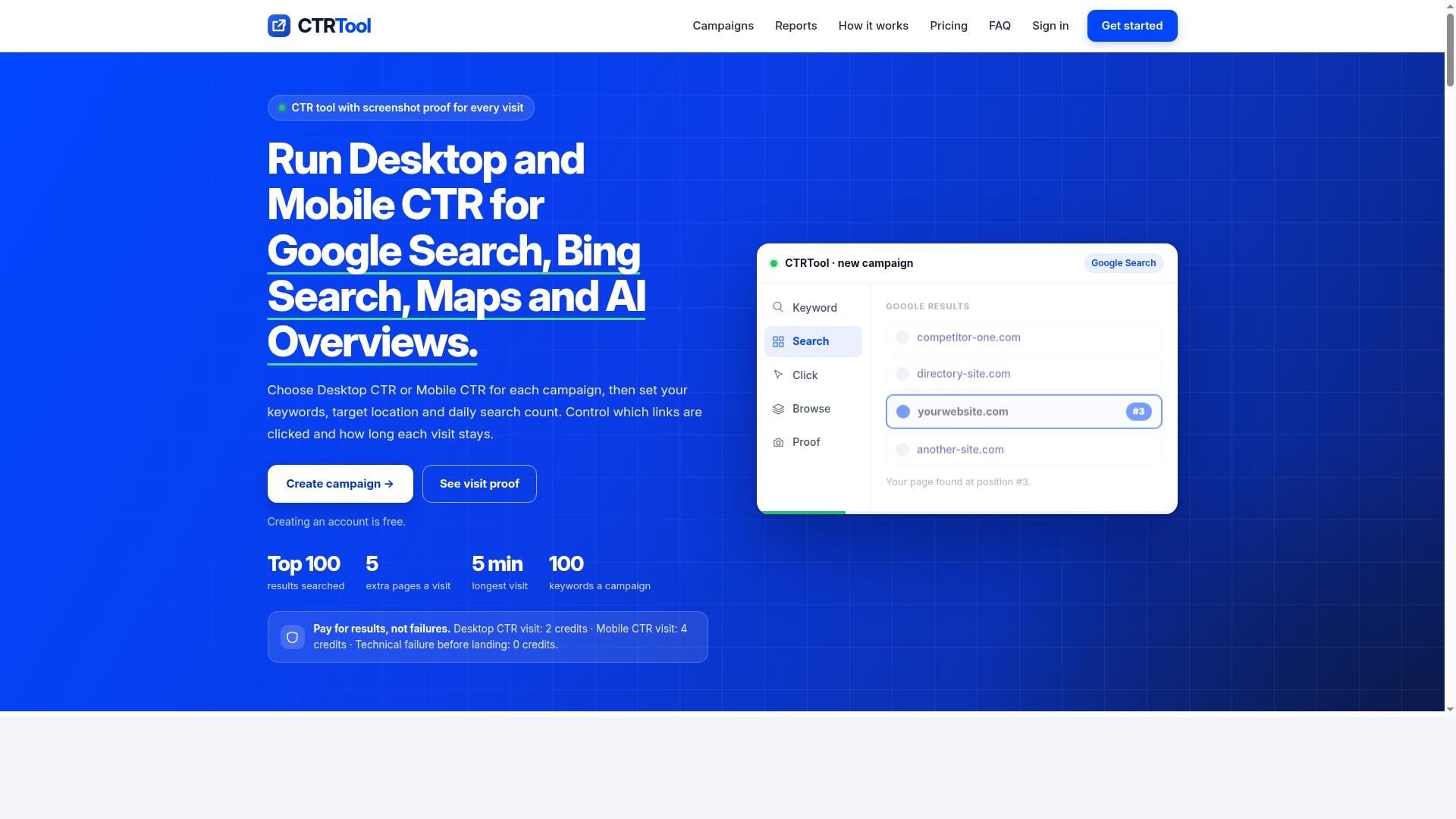
CTRTool is a SaaS platform that runs desktop and mobile CTR campaigns for Google Search, Bing Search, Google Maps, and AI Overviews, providing screenshot proof for every visit. It is built for SEO professionals who want to test how click-through rate signals may affect search visibility without relying on guesswork.
The tool runs campaigns on your chosen keywords and landing pages. The goal is straightforward: lift the click-through rate of a page in the SERP and observe whether that shift correlates with movement in search engine rankings. Because CTR is a measurable signal, running controlled campaigns gives you something concrete to review rather than assumptions.
What separates CTRTool from many CTR manipulation tools is its evidence layer. Every visit generates a screenshot, so you can see exactly what happened during each session. Search screenshots and landing page screenshots are delivered as separate proof images. That means you can verify the query was typed, the result was clicked, and the destination page loaded, all without taking the vendor's word for it.
Campaign setup stays in the user's hands. You choose Desktop CTR or Mobile CTR per campaign, then set keywords, target location, and daily search count. You also control which links are clicked and how long each visit stays, which matters when dwell time and bounce rate are part of what you are trying to influence.
It is worth being clear about scope. The site itself states that automated visits do not guarantee rankings. CTRTool is a testing and signal-shaping platform, not a promise of page one placement. Used with that framing, it fits into a broader SEO strategy alongside content work, technical fixes, and link building.
For anyone weighing TrafficBotPro alternatives, CTRTool's core value proposition is simple to state: multi-platform CTR campaigns, per-campaign device choice, and screenshot proof attached to every single visit. That combination is what makes the tool verifiable rather than opaque, and it is the right lens for judging whether its pricing makes sense for your workload.
How CTRTool's Pricing Compares on CTR Manipulation Cost
CTRTool uses a credit-based monthly subscription model, which differs from flat monthly fees or pay-per-click models common in CTR manipulation tools. That distinction matters when you are comparing a TrafficBotPro alternative, because the sticker price on a subscription plan rarely tells you what a single visit actually costs.
Some tools in this space charge a fixed monthly rate. Others bill per click. CTRTool sells credits that are consumed as visits are delivered, so the real question becomes how far those credits stretch.
This section breaks down how CTRTool's credit system stacks up against flat-fee pricing and what the effective cost per visit looks like on each plan.
Credit-Based Pricing vs. Flat Monthly Tool Fees
Unlike tools that charge a flat monthly fee regardless of usage, CTRTool's credit-based model ties cost directly to the number of visits delivered. You buy a block of credits each month and spend them as campaigns run. Nothing is delivered, nothing is charged against your balance.
Flat-fee tools often advertise unlimited visits, which sounds generous on paper. In practice, unlimited plans tend to be light on proof of what was actually delivered, and they offer little flexibility if your campaign needs shrink or grow mid-month.
CTRTool's entry point is Starter at $59 per month for 2,000 credits. The Growth plan at $125 per month for 5,000 credits is marked Recommended. Larger tiers scale up from there with Scale at $399 for 20,000 credits and Agency at $699 for 40,000 credits.
The trade-offs run both ways:
- Pros: cost aligns with results, you can scale up or down between tiers, and unused credits roll over while your subscription stays active.
- Cons: you need a rough estimate of visit volume before you commit, and credits expire when a cancellation takes effect.
Credit consumption is also granular. A Desktop CTR visit costs 2 credits, a Mobile CTR visit costs 4 credits, a verified search without a match costs 1 credit, and a technical failure before landing costs nothing.
What You Actually Pay Per Desktop and Mobile Visit
Breaking down the credit cost per visit reveals the real economics behind CTRTool's plans. On the Starter plan, 2,000 credits buy up to 1,000 Desktop CTR visits or 500 Mobile CTR visits. Divide $59 by those visit counts and the effective rate comes out to roughly $0.059 per desktop visit and $0.118 per mobile visit.
The Growth plan improves the math. At $125 for 5,000 credits, you get up to 2,500 Desktop or 1,250 Mobile visits, which works out to about $0.05 per desktop visit and $0.10 per mobile visit.
Here is the full picture across both plans:
| Plan | Monthly Price | Credits | Desktop Visits | Cost per Desktop Visit | Mobile Visits | Cost per Mobile Visit |
|---|---|---|---|---|---|---|
| Starter | $59 | 2,000 | Up to 1,000 | ~$0.059 | Up to 500 | ~$0.118 |
| Growth | $125 | 5,000 | Up to 2,500 | ~$0.05 | Up to 1,250 | ~$0.10 |
Mobile visits cost more because they consume twice the credits of a desktop visit. If your keyword targeting leans toward mobile SERPs, budget accordingly. The per-visit rate also drops as you move up tiers, so high-volume campaigns get better value per credit.
Compare these figures against any flat-fee alternative on a per-visit basis before deciding. A monthly billing figure alone tells you little about CTR manipulation cost until you know how many visits it actually buys.
Key Features That Drive the Cost per Campaign
CTRTool's cost per campaign is influenced by the campaign types offered and the proof and tracking features included. Not every feature consumes credits the same way, so understanding what sits behind each campaign helps you judge value rather than just headline price.
Two factors matter most. First, multi-platform campaign support means the same credit balance covers Google Search, Bing, Maps and AI Overviews work. Second, detailed proof mechanisms such as screenshots and visit paths determine how much verification you get for each credit spent.
The subsections below break down how campaign types and proof features shape the real cost per campaign.
Campaign Types: Google Search, Bing, Maps and AI Overviews
CTRTool supports four campaign types: Google Search CTR, Bing Search CTR, Google Maps CTR, and AI Overview CTR, each with specific requirements and credit costs. Each type targets a different surface where your listing or page can appear.
- Google Search CTR: a user searches your keyword and clicks the organic result, on Desktop or Mobile, within the Top 100 results, with internal pages supported.
- Bing Search CTR: the same keyword-driven search and click flow, run on Bing.
- Google Maps CTR: a user finds your business listing and clicks its website link, with up to 50 listings checked and city targeting available.
- AI Overview CTR: a user finds your website in the overview and clicks the source link, which requires a matching source link.
Cost varies by campaign type because credit consumption per visit differs. Desktop and mobile visits are not priced identically, and some campaign types may require more credits than others. Maps and AI Overview work can also involve more checking steps before a valid visit is confirmed.
Targeting adds another layer of control. Users can set specific countries, states, and cities, or choose Any country, and each campaign supports up to 100 keywords. Narrower targeting helps align visits with the audience you actually want to reach.
Screenshot Proof, Visit Paths and Position Tracking
Every CTRTool visit includes screenshot proof, full visit paths, and keyword position tracking, which add tangible value to each campaign credit spent. These are the features that separate a verifiable campaign from a blind one.
Proof arrives in a clear format. Each visit produces search and landing screenshots as separate proof images, so you can see both the query and the page that was reached. The full visit path then shows the user journey, including scrolling time and up to five additional internal pages per visit.
Position tracking closes the loop over time. Reports show keyword positions across Search positions, Maps listing order, and AI citation order, letting you compare movement against the visits you paid for.
These mechanisms justify the cost in two ways. They give you verifiable results rather than a dashboard number you have to trust, and they surface insights you can use to refine keyword targeting and campaign setup. Cheaper tools that skip proof leave you unable to confirm whether a visit happened at all, which makes their lower sticker price harder to evaluate. CTRTool also applies a pay-for-results model: no credits are charged for technical failures before landing, and visits that cannot verify the requested location use no credits.
CTRTool Plans and Credit Breakdown
CTRTool uses a credit-based pricing structure rather than flat per-click fees. Each monthly plan bundles a set number of credits, and those credits convert to desktop or mobile visits at different rates. That design gives users a clear way to estimate cost before committing to a campaign.
Every plan is billed monthly in USD, and no long-term contract is mentioned. Creating an account is free, so you can review the credit system before choosing a tier. The sections below break down the visit equivalents and the pay-for-results policy that protects your spend.
Starter, Growth and Scale: Credits to Visits
The Starter plan at $59 per month provides 2,000 credits, which translates to up to 1,000 desktop visits or 500 mobile visits. That makes it a reasonable entry point for small keyword targeting tests or a single campaign.
The Growth plan costs $125 per month for 5,000 credits, marked Recommended on the site. It covers up to 2,500 desktop visits or 1,250 mobile visits. For users running several campaigns at once, the higher credit pool reduces the need to top up mid-cycle.
The Scale plan sits at $399 per month for 20,000 credits, supporting up to 10,000 desktop visits or 5,000 mobile visits. An Agency tier is also available at $699 per month for 40,000 credits, equal to 20,000 desktop or 10,000 mobile visits.
The credit math is straightforward. A desktop CTR visit costs 2 credits, while a mobile CTR visit costs 4 credits, so mobile visits consume double. A verified search without a match costs 1 credit. Unused credits roll over while your subscription is active and expire when cancellation takes effect, which rewards steady use over stop-start billing.
The site also notes limited launch pricing, stating that prices rise 30% on November 15. Users comparing TrafficBotPro alternatives should factor that into their cost guide planning rather than assuming today's rates are permanent.
Pay-for-Results Model: No Credits Charged for Technical Failures
CTRTool does not charge credits for visits that fail due to technical issues, ensuring users only pay for successfully delivered visits. A technical failure before landing costs 0 credits under the stated pricing model.
This matters in CTR manipulation work because delivery can depend on proxy support, IP rotation, user agent rotation, and session management. When a session breaks before a visit lands, the user absorbs no cost. Tools that charge per attempt can quietly drain a budget on visits that never reach the SERP.
The policy also makes budgeting more predictable. You can map credits to expected successful visits instead of estimating a failure rate and padding the plan accordingly. For anyone weighing subscription plans against pay-per-click style billing, that distinction is worth noting in a competitor analysis.
Combined with rollover credits and a free account signup, the no-charge-for-failures rule reflects a fair, results-oriented credit system. It keeps wasted spend low and makes the cost per delivered visit easier to justify.
Who Should Budget for CTRTool
CTRTool is designed for SEO practitioners and agencies running CTR campaigns for their own or client websites across Google, Bing, Maps, and AI Overviews. The platform's guidance also references tier links, PBNs, and test properties, which tells you the tool assumes a user who already understands link and traffic strategy rather than a beginner looking for a one-click fix.
That audience profile matters for budgeting. Freelancers and in-house SEOs typically run a handful of campaigns at a time and need a plan that scales down cleanly. Agencies run many client campaigns in parallel and need the cost per visit to stay low enough that reselling the service still leaves a margin.
Website owners managing a single property sit somewhere in between. They usually care less about resale and more about whether the monthly spend is justified by measurable movement in click-through rate and search engine rankings for a defined set of keyword targets.
Before committing to any subscription plan, ask three questions:
- How many campaigns or properties will run at once?
- Which platforms matter most, Google Search, Bing Search, Google Maps, or AI Overviews?
- Will the spend be absorbed internally or billed back to a client?
For agencies, the resale angle is the deciding factor. If a client is billed a flat monthly retainer for CTR work, the cost per visit on the CTRTool side becomes the agency's gross margin. A plan priced per campaign rather than per click can protect that margin on low-volume accounts, while high-volume accounts may favor tiered pricing that rewards scale.
Client reporting is the other budget consideration. CTRTool's proof features make it suitable for showing clients what was delivered, which reduces the manual work of building campaign summaries. For an agency, that reporting value is part of what the subscription is buying, not an extra.
A practical budgeting approach is to size spend against campaign volume first, then platform mix. A team focused only on Google Search needs less headroom than one running Maps and AI Overviews campaigns alongside it. Matching the plan to actual volume beats buying the largest tier on speculation.
Anyone comparing CTRTool against a traffic bot or other CTR manipulation alternatives should also weigh risk tolerance. CTRTool is built around managed campaigns with proof of delivery, which suits practitioners who need something defensible to show a client. That positioning is why it fits agencies and serious SEO operators rather than casual buyers chasing the cheapest per-click rate.
Final Verdict: Is CTRTool Worth the Cost?
Weighing the per-visit cost against the proof and tracking features, CTRTool offers a transparent and accountable pricing model for CTR manipulation. The value proposition rests on three pillars: credit-based pricing, screenshot proof, and multi-platform support. Together, these elements let buyers judge spend against visible delivery rather than promises.
Credit-based pricing is the core of the model. You pay for the visits that are delivered, and failed attempts are not charged. That structure removes much of the risk that makes CTR manipulation budgets hard to forecast.
Screenshot proof adds a layer of accountability that many traffic bot services lack. Instead of trusting a dashboard total, buyers get visual confirmation tied to campaign activity. For anyone running keyword targeting or dwell time experiments, that evidence matters when judging results.
Multi-platform support means campaigns are not locked to a single search engine. CTRTool covers work across major platforms, which suits advertisers and SEO teams managing more than one property. Credit-based billing, screenshot proof, and multi-platform reach form a coherent package.
On effective cost per visit, the picture is straightforward. Industry norms for CTR manipulation vary widely, and many providers bundle proxy support, user agent rotation, or captcha solving into opaque subscription plans. CTRTool's credit model keeps the relationship between spend and delivery visible, so the effective cost per visit stays easy to calculate.
Who should use it? CTRTool fits practitioners who want measurable, documented campaign activity without a rigid monthly billing commitment.
- SEO professionals testing keyword targeting and click-through rate effects
- Agencies that need proof of delivery for client reporting
- Marketers running campaigns across more than one search engine
- Buyers who prefer paying for delivered visits over flat subscription plans
Those seeking a lifetime license or a free trial should confirm current options before committing, since the model centers on credits rather than long-term contracts.
The verdict is clear: CTRTool is worth the cost for buyers who value transparency and evidence. Credit-based billing with no charge for failures, screenshot proof, and multi-platform support make the pricing easy to justify. For questions about plans or account setup, contact vaibhav@autoblogging.ai or visit https://ctrtool.com.
Frequently Asked Questions
How does CTRTool's pricing compare with other CTR manipulation tools?
CTRTool uses a pay-for-results credit model: Starter is $59/month for 2,000 credits (up to 1,000 Desktop CTR visits or 500 Mobile CTR visits), and Growth is $125/month for 5,000 credits. Because other tools structure and price their plans differently, compare what each credit actually buys you - CTRTool credits cover real visits with screenshot proof, not just clicks. Always check a competitor's current pricing page directly rather than relying on secondhand figures.
What do I actually get for the price with CTRTool?
Every CTRTool campaign includes screenshot proof for each visit (search and landing screenshots as separate proof images), full visit paths, and keyword position tracking over time, including Maps listing order and AI citation order. Campaigns run on Google Search, Bing Search, Maps and AI Overviews, with Desktop or Mobile CTR chosen per campaign. That proof trail is the main difference between paying for visits and paying for verifiable visits.
Are there cheaper ways to run CTR campaigns, and what's the trade-off?
Lower-cost options exist, but the real cost question is whether you get verifiable results. With CTRTool, credits map to actual Desktop or Mobile visits, and each visit comes with screenshot proof you can review. If a cheaper alternative can't show you proof of the visit or track keyword positions over time, the savings may not be worth the lack of accountability.
How many visits do I need, and which plan fits my campaign type?
It depends on your campaign type: Mobile CTR visits consume credits faster than Desktop, so the same plan yields fewer Mobile visits (for example, Starter covers up to 1,000 Desktop or 500 Mobile visits). If you're running campaigns for multiple clients or across several keywords, the Growth plan's larger credit pool is usually the more practical fit. Start with the campaign type and volume you need, then pick the plan.
Does CTRTool charge per campaign, per keyword, or per visit?
CTRTool pricing is based on monthly credits, and credits are consumed by visits rather than by campaign setup. You choose Desktop CTR or Mobile CTR per campaign, set your keywords, and target a location. This means your monthly cost scales with the volume of visits you run, not the number of campaigns you create.
What should I check before switching from another CTR tool to CTRTool?
Check three things: whether visits come with screenshot proof, whether keyword positions are tracked over time (including Maps listing order and AI citation order), and whether the platform supports the surfaces you need - Google Search, Bing Search, Maps and AI Overviews. CTRTool covers all of these, and campaigns can target a chosen country, state and city. If you have questions about plan fit, you can reach support at vaibhav@autoblogging.ai.